

 German
 Greek
Greek Spanish
 Filipino
 French
 Italian
 Dutch
Dutch Polish
 Portuguese (Brazil)
 Russian
 Vietnamese
 Turkish
 Ukrainian
 Chinese (Simplified)
 Korean
 Japanese
 Thai
Thai Arabic
 Persian
Dash Platform 5.0
Planned release date October 26th.
Samuel Westrich · October 2026 · 20 min read
A series in three parts
- Dash Platform 5.0 (you are here)
- Who moderates Yappr?
- How to start or join a Yappr moderation team
Dash Platform 5.0 is one of the biggest Platform releases we have shipped. It has been live on testnet since October 15, and we plan to release it for mainnet next Monday, October 26.
This is the first of three posts. This one covers what is in 5.0 and when it goes live. The second explains how moderation elections work and why Yappr uses them. The third is a step-by-step guide to starting or joining a moderation team.
The short answer
The dates. Platform 5.0 is released for mainnet on Monday, October 26. If enough evonodes have upgraded, the upgrade locks in on Friday, October 30, and protocol version 14 goes live on Sunday, November 8.
The headlines. Apps can moderate themselves, and communities can elect their moderators. Any token can have its own shielded pool, so balances and payments can be private. Apps can charge fees and earn from them, in the open. Data contracts can check their own links and rules without smart contracts. And apps can show provable trending lists, leaderboards and “posts I liked” pages, at a much lower cost.
What to do. Node operators: update with dashmate before October 30. App developers: move to the 5.0 SDKs before November 8.
The timeline
Here is every date, from testnet through to Yappr opening on mainnet:
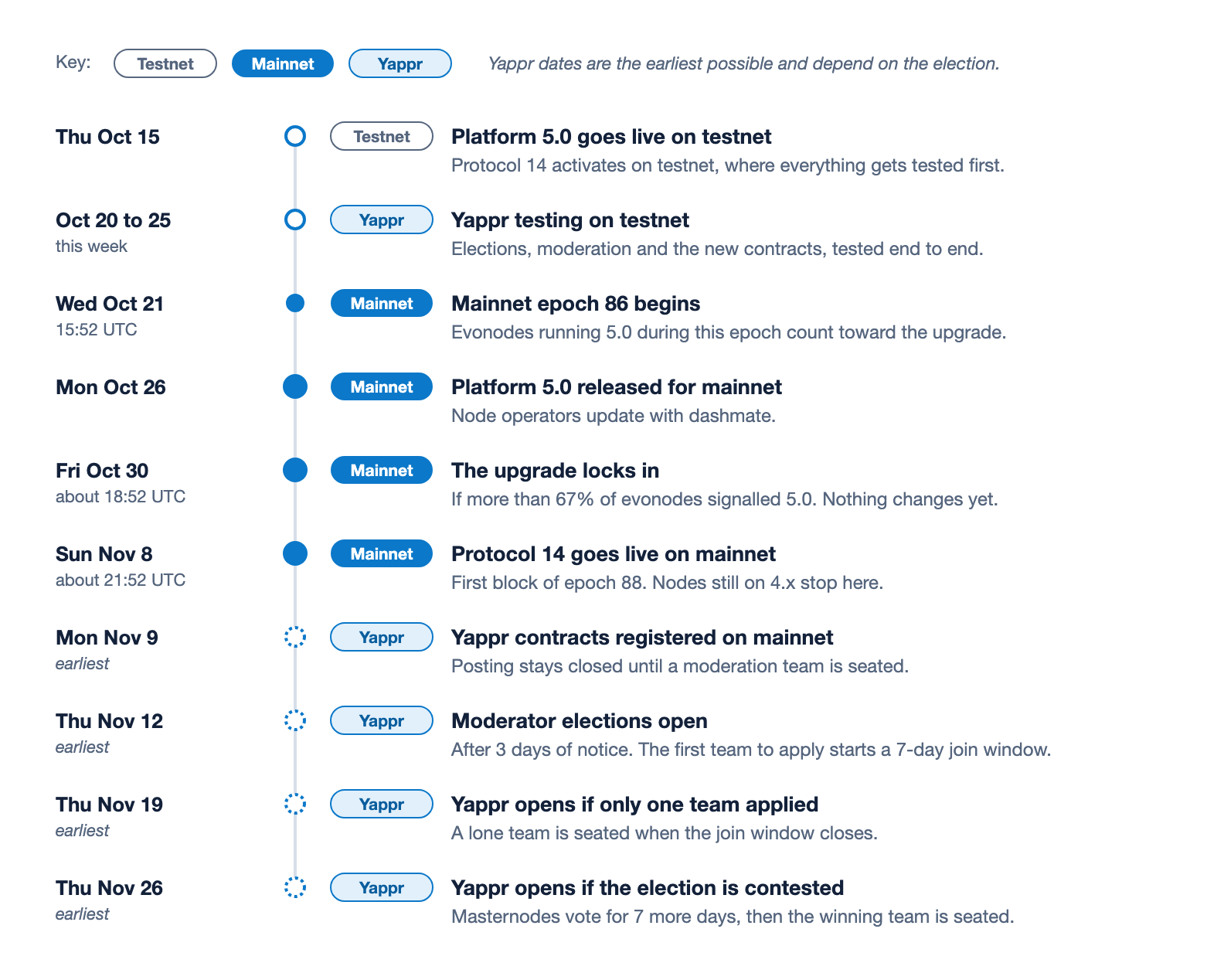
Figure 1. Every date in one place. The mainnet times come from the epoch schedule and can shift by a few minutes. The Yappr dates are the earliest possible: they assume the contracts are registered the day after activation and a team applies as soon as elections open.
This week we are testing Yappr on testnet end to end: elections, moderation and the new contracts. That is the last big rehearsal before mainnet.
How an upgrade goes live
Releasing 5.0 does not switch mainnet over by itself. The evonodes decide when, and they do it in three steps that follow Platform’s epochs. On mainnet an epoch lasts 9 days and 3 hours.
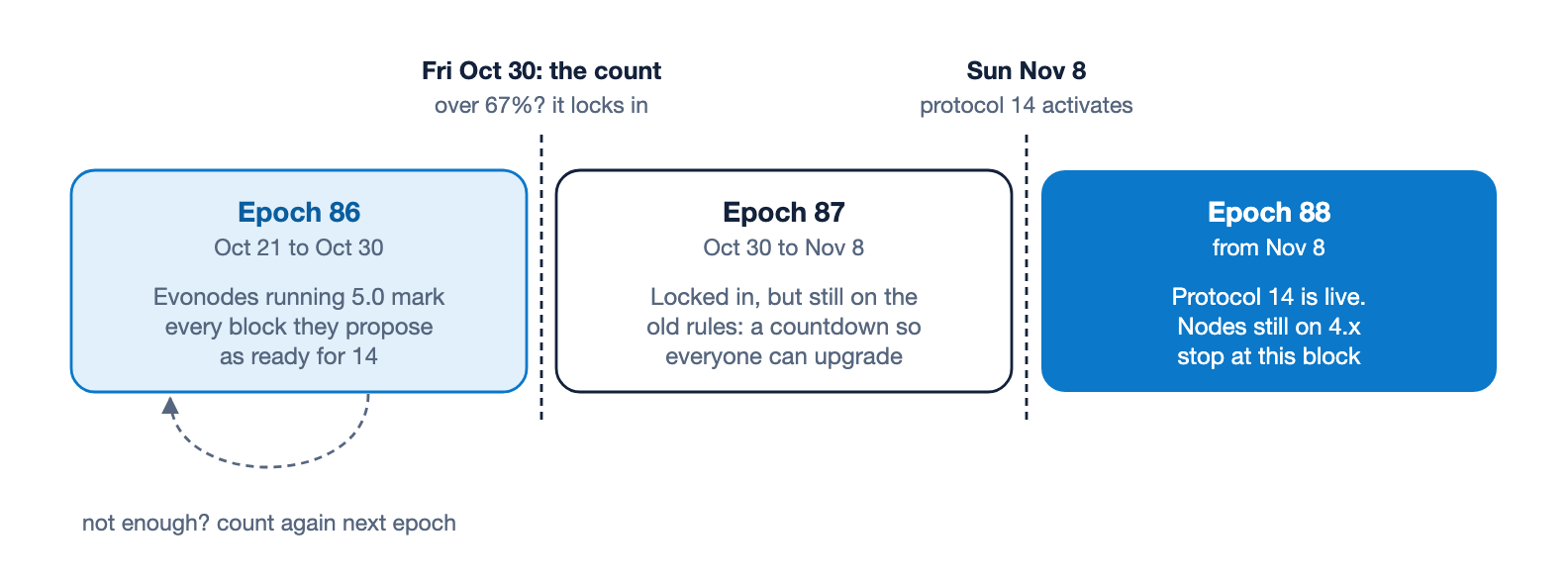
Figure 2. An upgrade can only lock in at the start of an epoch, and it goes live one full epoch later. Mainnet epochs last 9 days and 3 hours.
- Signal. Every evonode running 5.0 marks each block it proposes as ready for protocol 14. The network keeps one up-to-date vote per evonode.
- Lock in. At the start of the next epoch, the network counts. If more than 67% of active evonodes signalled 14, the upgrade locks in. From that moment it cannot be stopped, and the activation date is fixed.
- Go live. For one full epoch the network keeps running the old rules, which gives everyone time to finish upgrading. Protocol 14 starts with the first block of the epoch after that.
The epoch that matters started on Wednesday, October 21, and ends on Friday, October 30 at about 18:52 UTC. Evonodes that upgrade after the release on Monday and propose a block before Friday count toward the vote. If fewer than 67% have signalled by then, nothing breaks: the network simply counts again at the next boundary, which would move lock-in to November 8 and activation to November 18.
On its first block, protocol 14 also does some one-time setup. It adds two new system contracts, Moderation Charters and App Connect, updates DashPay, Withdrawals and Token History, and prepares the storage the new features need.
If you run a node
Update with dashmate as soon as the release is out, and before Friday, October 30, so that your evonode’s vote counts:
dashmate stop
npm install -g dashmate
dashmate update
dashmate start
Do a full stop and start rather than restarting Platform alone: 5.0 needs Core to reload its RPC settings once, and Drive will not start until it has. Every Platform node needs 5.0 before November 8. A node still on 4.x keeps running until then, with a warning in its logs, and stops at the activation block until it is upgraded. 5.0 is also ready for Dash Core 24.
If you build apps
Move to the 5.0 SDKs (@dashevo/evo-sdk 5.0 and the 5.0 Rust SDK) before November 8. Document ids, the way documents are stored and the proofs clients accept all change at protocol 14, so documents created by older SDKs are refused once it is live. Contracts that charge the new action fees also need every write to state the fee it agrees to, which the 5.0 SDKs handle for you.
What is in 5.0
5.0 is a big release, so here it is at a glance first. Each card jumps to its section.
- Moderation: Banlists, suspensions, warnings and removals with public reasons. Elected moderation teams.
- Private tokens: A shielded pool for any token, plus non-transferable tokens and once-per-identity airdrops.
- Earning: Action fees for app owners and moderators, fee agreements, sponsored gas, cheaper short-lived data.
- Smarter contracts: Links the network checks, rules without smart contracts, lists, expiry dates, fair name claims.
- Queries: Provable top lists, trending windows, hashtags, “posts I liked” and whole feeds in one proof.
- Keys and login: Keys limited to one app, spending budgets and expiry, contract groups, App Connect.
- Names and votes: Cheaper usernames and votes, fairer ties, protection against flooding.
- Under the hood: Smarter withdrawal limits, shielded credits, Core 24, GroveDB 6.1, hardening.
Apps can moderate themselves
Until now, nothing on Dash Platform could keep an abusive identity out of an app. With 5.0, a data contract can keep a banlist, a suspension list and a warning list, and its moderators can remove documents. Every action carries a public reason, a removed document leaves a record behind, and a removal can be undone within a week. A contract can also hand moderation to a team that masternodes and evonodes elect from public charters, paid from the app’s own fees. The second post in this series explains how that works and why Yappr uses it.
Private tokens with shielded pools
This is one of the parts of 5.0 I am most excited about. Any token can now have its own shielded pool, using the same Orchard technology Platform already uses for private Dash credits. Tokens in the pool are held as private notes, and inside it nobody can see who holds how much, or who paid whom.
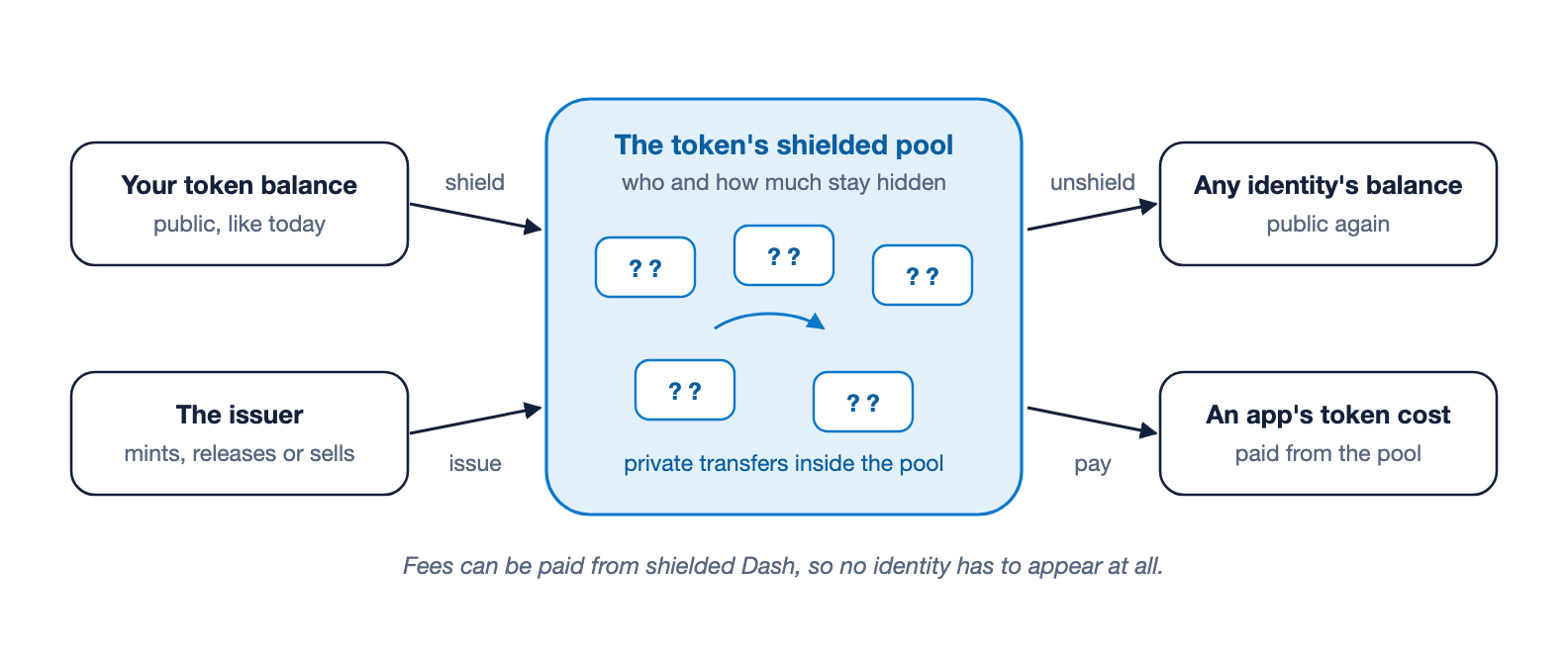
Figure 3. Tokens enter a pool from a balance or straight from the issuer, move privately inside it, and leave to any identity or pay for an app action. Inside the pool, nobody can see who holds what or who paid whom.
- In and out. Holders move tokens from their balance into the pool, and back out to any identity. Moving in shows the amount, and moving out shows the amount and who receives it. Everything in between is private.
- Straight from the issuer. An issuer can mint new tokens directly into the pool, release scheduled distributions into it, and sell tokens straight into it, so tokens can be private from the moment they exist.
- Private payments in apps. When an app charges a token for an action, like creating a document, the cost can be paid from the pool.
- No identity at all. A private transfer, a withdrawal to a recipient, or a purchase into the pool can pay its fee from Platform’s shielded Dash, so no identity shows up anywhere.
There are trade-offs, and I want to be upfront about them. Each token has its own pool, so a token’s privacy grows with how many people use that pool: a pool holding a handful of notes hides very little. An issuer can require a minimum number of notes, up to 250, before tokens can leave the pool. A token with a pool cannot freeze or confiscate balances, because nobody holds a note in a way an issuer could act on, so those controls have to be switched off for good when the token is created. Pausing a token still works. Whether a token has a pool is decided when the token is created and cannot be changed later.
That makes shielded pools a good fit for things like a community currency, rewards, or paying people in a token, where balances are nobody else’s business.
More for tokens
Tokens can now be non-transferable, for things like points, reputation or allowances that should stay with the person who earned them. A token can offer a once-per-identity claim, an airdrop that every identity can take exactly once. And token payments for documents now respect a token’s pause and freeze rules.
Apps can earn, in the open
Apps could already charge their own tokens for actions. 5.0 adds fees in plain credits, split between the app’s owner and its moderators, and it is designed so users always know what they are paying.
Action fees
A document type can charge a fixed fee in credits for an action: creating, replacing, deleting, transferring, repricing or buying a document. Each fee has two parts. One goes into a pot for the app’s owner, the other into a pot for its moderators. The fee is either a fixed amount, or it follows the network’s fee multiplier, so it stays in step with normal fees. Only actions that actually happen pay, and the fees are fixed when the contract is created, so an app cannot quietly raise them later.
For example, creating a post could cost an extra 0.001 Dash for the moderators and 0.0001 Dash for the app’s owner, on top of the normal network fee.
Paying out the pots
Each pot can be claimed once per epoch, about every nine days. The owner pot goes to the contract owner. The moderators pot is split equally among the moderators, or, for an elected team, the way its charter says. Anyone can look up how much is in each pot and when it was last claimed, with a proof.
No surprise charges
Every write to a priced action states the fee its signer saw, and for fees that follow the multiplier, how much of a rise the signer accepts, for example up to 20%. If the price would be higher than what was signed, the network refuses the write and charges nothing for the attempt. A fall in price is always fine. So an app can never make a transaction you already signed cost more.
Sponsored gas and free usage
For actions paid with a token, the app’s owner can now pay the network fee instead of the user. Combined with optional token costs, this makes “free” apps possible: the app hands out tokens, people use the app for free while their tokens last, and then carry on paying normal fees themselves. A user who adds a priority tip to their own transaction still pays for that tip.
Pay only for how long data lives
Documents that expire (see smarter contracts) pay storage for their lifetime only, not forever. A document that lives for a day costs 4 credits per byte, one that lives a year about 1,360, against 27,000 per byte for permanent storage. The fee is paid out to the epochs the document actually lives through.
Smarter data contracts
Data contracts got a lot more expressive in 5.0, without becoming smart contracts. Everything here is declared in the contract and checked by every node, with no code to run.
Links the network checks
A property can now say what it points at, and the network checks that the target exists whenever a document is created or replaced. A target can be an identity, a contract, a token, one of an identity’s keys, or another document.
"replyTo": { "type": "identifier",
             "refersTo": { "type": "deletableDocument", "documentType": "post" } }
Document targets come in three kinds, and the difference matters:
- Permanent documents can never disappear, so a link to one can never dangle.
- Moderated documents can only be removed by moderators, and every removal leaves a record, so the link always leads somewhere: to the document or to its removal record.
- Deletable documents can disappear, so a link to one is checked again every time the linking document changes.
Finding the right target
A link can do more than point at an id:
- Find it by its fields. A link can find its target through a unique index and check the target’s fields. A bid can require an auction that is open, has not ended, has a reserve price no higher than the bid, and is not owned by the bidder.
- Gate who may write. A type can require its writer to be linked to something, such as “only members of this team may post” or “only people with a profile may comment”.
- Pick from a list. A value can be required to be one of the entries in a list on another document, like a removal that must name one of a team’s elected members.
- Combine targets. One link can accept any of several targets, or require all of them.
- Require things of a contract or a key. A link to a contract can require it to be read-only, a certain age, or moderated by an elected team. A link to a key can require the key’s purpose, and that it is limited to this contract.
A document can carry up to 256 links.
Rules every node enforces
A document type can now state rules about its own fields, and every write must satisfy them. Rules can do arithmetic, compare values and text, check lists, test whether fields are present, and combine all of that with and, or, not and if-then. They can also read three things beyond the document itself:
- Totals of other documents, such as “at most 10 listings per seller” or “pledges stay within the goal”.
- The previous version of the document, such as “a closed order stays closed” or “a counter never goes down”.
- The document it links to, such as “a bid must meet the auction’s reserve price”.
"propertyConstraints": {
  "depositCoversOrder": {
    "lessThanOrEqual": [{ "multiply": [{ "add": ["price", "fee"] }, "quantity"] }, "deposit"]
  }
}
A type can have up to 16 rules. The arithmetic is exact, so an overflow or a division by zero refuses the write instead of quietly rounding.
Rules for deleting
The same kind of rules can decide when an owner may delete a document. A poll can refuse to be deleted while any vote still points at it. A document can also be made deletable only when something else uses it up, which is how a “reserve, then claim” flow works.
Fields that freeze
A contract can now make fields unchangeable, either from the moment a document is created or once a condition holds. A post’s author never changes, its text can be edited for the first five minutes, and its body freezes once it is published.
Lists, sizes and generated values
- Lists. A property can be a typed list of up to 1,024 numbers, strings, identifiers or byte values, such as up to 10 unique tags on a post.
- “Not yourself”. An identifier can be required to differ from another one, or from the owner: you cannot delegate to yourself, and a buyer cannot be the seller.
- Byte limits. A text field can be capped in bytes as well as characters, which matters for emoji and other wide characters.
- Generated values. The network can fill in a field from another one, for example a lowercase, look-alike-safe version of a username, so “Bob” and “B0B” cannot both be taken.
- Shorter schemas. Identifiers and fixed-size byte fields have short spellings.
Adding a required field later
A contract update can now add a required field. Documents written before the update stay valid without it, because every document records which version of the contract it was written under.
Documents that expire
A document type can set a lifetime, from one hour to one year, after which the network deletes its documents on its own. Stories, invitations and offers no longer need someone to clean them up, and they cost much less to store, as described under earning.
Claiming names fairly
Any contract can now run a “commit, then reveal” flow, the same idea DPNS uses for usernames. You first publish a hidden commitment to a value, then reveal it in a later block. Watchers cannot see the value in time to copy it, and if several people commit to the same value, only the earliest valid commitment can reveal. This stops front-running for names, handles and anything else first-come, first-served.
Encryption declared in the contract
A contract can declare exactly how a field is encrypted: to whom, with which keys, and with which scheme. Wallets read the recipe straight from the contract. This is how private join requests for moderation teams and App Connect logins work.
For contract authors
A few authoring rules change at protocol 14:
- Property and document type names can no longer contain a
-. - Reordering the indexes in a contract update is now allowed.
- A contract update cannot change an integer’s size or sign.
- Transient values are never stored, even on a replace.
- Unsigned integers now sort by value in indexes. The activation block rewrites existing index keys to match.
Top lists, trends and feeds, with proofs
Social apps count and rank things all day. In 5.0 they can do it on chain, and every answer comes with a proof that a light client can check against the network itself, without trusting the node it asked.
Top lists
A ranked index keeps groups in order by their count, sum or average. “Top 10 posts by likes”, “best-rated stores” or “hashtags with more than 100 posts” read just the entries they return, so the proof stays small however many groups exist. Queries use plain ORDER BY and HAVING, up to 100 results at a time.
Trending windows
A time-range index sorts documents into rolling windows, such as the last hour starting every 15 minutes, or each day. That is what trending lists and “today’s leaderboard” need. A window can also be unique, which gives rules like “one post per day”. Old windows can be dropped automatically after up to a week.
Number bands
The same windows work over any number, so an app can group listings by price band or players by score band.
Likes and follows that cost less
Some documents are really just entries in an index: a like, a follow, a bookmark. 5.0 lets a type store only those index entries, with no full document, which cuts the storage of a small document by more than half. Such types can keep a counter per group instead of an entry per document, start counters at zero so a post with no likes still ranks, and keep an entry in a trending window even after an unlike.
Indexing what a document links to
An index can include a value from the document a link points at, without storing it twice. Indexing replies by the post’s author answers “every reply to my posts” directly.
Hashtags and mentions
A list property can be indexed element by element, so a post appears once under each of its tags. “Posts tagged dash, newest first”, “posts that mention me” and “most used hashtags” all become simple queries.
“Posts I liked” in one proof
A chained query answers a question that spans two document types, like “the posts I liked”, in a single request with a single proof. The client checks the join itself, so a node cannot steer the result.
A whole feed card in one request
A composite query loads a page together with everything it needs, such as quoted posts, counts, profiles, names and whether you liked each post, under one merged proof. Yappr’s home feed is built on these.
Smaller improvements
- Queries can use more than one
INclause on consecutive index fields. - Anyone can now list every contract on Platform, in pages, and check the latest version of up to 100 contracts in one proved request.
- A range query can prove that a range is empty.
Keys and login
Giving an app a key used to mean trusting it with a lot. 5.0 makes keys much narrower, and adds a proper way to log in to apps with your wallet.
Keys limited to one app
An authentication key can now be bound to a single contract, a single document type, or a contract group. A bound key can only sign document and token actions inside its bounds. A key you give a social app can post and like on that app, and nothing else.
Budgets and expiry dates
A key can also carry a spending budget in credits and an expiry date. Once the budget is spent or the date has passed, the network refuses the key. A game could get a key that can spend at most 0.1 Dash and stops working after 30 days. You can later raise a key’s budget or extend its expiry, and anyone can check, with a proof, how much a key has left. To restrict a key further, you disable it.
Contract groups
An identity can now bundle several contracts, document types and tokens into a contract group, for example all the contracts that make up one app. A key bound to the group covers the whole app. Groups can only grow, and anyone can read what is in a group.
App Connect: log in with your wallet
App Connect is a new system contract for logging in to apps with your wallet:
- The app asks to connect.
- You approve in your wallet, and choose what the app may do: which contract, how much it may spend, and for how long.
- The wallet registers those limited keys on your identity and posts them for the app, encrypted so only the app can read them.
- The app picks up its keys, checks they are live, and you are logged in. Your wallet’s own keys never leave the wallet.
The Swift example app already uses the same idea to log a browser in over Bluetooth: you check a pairing code on both screens, choose the key’s lifetime and budget, and your phone hands the browser a limited key directly.
Key fixes
Contract-level encryption and decryption keys that always point at an identity’s latest key now register correctly. Before 5.0, registering one failed.
Names and votes
Contested usernames, the ones masternodes vote on, get cheaper, fairer and harder to abuse.
Cheaper names and votes
The fund to contest a name halves, from 0.2 Dash to 0.1 Dash. A masternode vote costs 80% less, down from 0.0001 Dash to 0.00002 Dash.
Ties go to the earliest
When a contest ends in a tie, the contender who entered first now wins. Before 5.0 the latest one did. This applies to every contest that ends after protocol 14 is live.
No flooding
A contest can hold at most 1,000 contenders, and joining gets more expensive as it fills up. The fund doubles once a contest has 250 contenders, and again every 50 after that:
| Contenders already in | Fund to join a name contest |
|---|---|
| 0 to 249 | 0.1 Dash |
| 250 to 299 | 0.2 Dash |
| 300 to 349 | 0.4 Dash |
| 700 to 749 | 102.4 Dash |
| 950 to 999 | 3,276.8 Dash |
A contender states the most it is willing to pay and is charged the current amount. The final count of a contest now covers every contender.
Contests that always have a winner
A contested index can now be declared without a Lock option, so the contest always ends with a winner, and a lone contender wins as soon as the join window closes. Usernames keep the Lock option. Moderation elections use the new kind.
Cleaner votes
Identifiers among a contest’s values are now stored one way, so writing the same name two ways cannot split one contest into two. And the SDKs now read how many contenders a contest has and set the fund to pay automatically.
Under the hood
Not everything in 5.0 is a feature you will see. These changes make Platform safer, steadier and ready for what comes next.
Smarter withdrawal limits
The daily withdrawal limit used to be a flat 2,000 Dash. It is now 15% of all the credits Platform held a day earlier, and never less than 500 Dash, so it grows with Platform. Withdrawals also have to fit a second limit tied to Dash Core’s credit pool, which never drops below 1,500 Dash. For the first day after activation, the old 2,000 Dash limit still applies.
Withdrawals too small to send
A withdrawal so small that Core can never send it used to be retried forever. It now ends with a clear failed status. Those credits are not refunded.
Shielded credits
Credits can now move straight from an identity into the shielded pool, and from the shielded pool back into an existing identity.
Dash Core 24
5.0 understands Dash Core 24’s new blocks, transactions and masternode types. Protocol 14 needs to be active on mainnet before Core 24’s new rules activate there, which is one more reason to upgrade on time.
GroveDB 6.1
Platform moves to GroveDB 6.1, its storage engine, and fee estimates now size counting and summing trees correctly.
System contract updates
- DashPay profiles can carry a Core payment address, a Platform payment address and a shielded address.
- Withdrawals gains the failed status.
- Token History records once-per-identity claims.
- App Connect and Moderation Charters are new.
How documents are stored
Documents are now stored in a new format that records which version of the contract each one was written under, which is what makes adding required fields later possible. New document ids also include a number tied to the transaction that creates them, so every id can only ever be used once. The 5.0 SDKs handle both.
What happens on the activation block
The first block of protocol 14 does some one-time work: it rewrites unsigned number index keys, adds App Connect and Moderation Charters, updates DashPay, Withdrawals and Token History, records a version for every existing contract, and creates the storage the new features need.
Hardening
5.0 also carries a long list of fixes and hardening from audits, testing and testnet. The node also stops rewriting its entire saved state on every block, which makes it lighter to run.
What comes after 5.0
Some things are deliberately not in 5.0. Replacing a seated moderation team through a challenge vote, amending a team’s charter, and appeals all come in later versions. On Yappr, mainnet opens for posting once the network has elected its first moderation team, which at the earliest is about eleven days after protocol 14 goes live.
Let’s ship it!
Samuel
About the author

Samuel Westrich
CTO, Dash Core Group
Samuel Westrich
CTO, Dash Core Group